You can test your bsnl broadband download speed direct form the official bsnl broadband site dataone.in or u can log on to direct link :
http://speedtest.dataone.in:83/bandwidthmeter/initialmeter.php
remember this speed test is based on BSNL servers not applicable to the normal websites
.


Run Windows XP in Windows 7 (Windows XP mode)

Windows XP mode
Most of the users who are using windows xp love working on it , its gives so much comfort in working on windows xp, the software which might not work properly with Vista are the reason behind mass users still not migrating to the Windows Vista ,
But with windows 7 at the dorr step , you might find urself relaxed !
yes One of the main features of Windows 7 is Windows XP Mode :
what is exactly Windows XP mode ?
Acc to official website, The new Windows XP Mode lets you run older Windows XP business software right on your Windows 7 desktop.
The feature, designed primarily with small- and medium-sized businesses in mind, comes as a separate download and works only with Windows 7 Professional and Ultimate. Windows XP Mode also requires virtualization software such as Windows Virtual PC. Both are available free on the Microsoft website.
the requirements for Windows XP mode are :
An additional 1 GB of RAM, an additional 15 GB of available hard disk space, and a processor capable of hardware virtualization with Intel VT or AMD-V turned on
.
Microsoft Windows 7 System Requirements :
If you want to run Windows 7 on your PC, here's what it takes:
•1 gigahertz (GHz) or faster 32-bit (x86) or 64-bit (x64) processor
•1 gigabyte (GB) RAM (32-bit) or 2 GB RAM (64-bit)
•16 GB available hard disk space (32-bit) or 20 GB (64-bit)
•DirectX 9 graphics device with WDDM 1.0 or higher driver
.
•1 gigahertz (GHz) or faster 32-bit (x86) or 64-bit (x64) processor
•1 gigabyte (GB) RAM (32-bit) or 2 GB RAM (64-bit)
•16 GB available hard disk space (32-bit) or 20 GB (64-bit)
•DirectX 9 graphics device with WDDM 1.0 or higher driver
.
Best free media Player VLC 1.0.0 is out , check out
One of the best free media player which hav almost allthe media codecs , n well plays almost evrything smoothing ...........
The new Latest version with tons of new feature is just out now : VLC 1.0.0
No need to download those countless codecs before you play your stuff so download the best media player available for Free!........
Download here : http://www.videolan.org/vlc/download-windows.html
website: http://www.videolan.org/
.
The new Latest version with tons of new feature is just out now : VLC 1.0.0
No need to download those countless codecs before you play your stuff so download the best media player available for Free!........
Download here : http://www.videolan.org/vlc/download-windows.html
website: http://www.videolan.org/
.
yahoo messenger hack : Change the title text
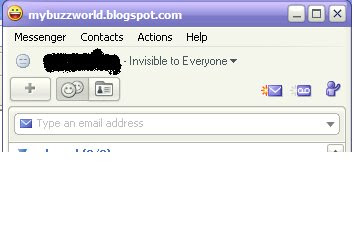
Hack yahoo messenger- Change ur yahoo Messenger title text that appears on the top of the yahoo messenger window , ByDefault its " yahoo!messenger " but you cab change it anything you like
This is how u do it -
go to c:\Program Files\Yahoo!\Messenger
find the file named - " ymsgr.ini "
open it with notepad
Now add the following lines below the opened file:
[APP TITLE]
caption=YOUR TEXT
and save the file , now its done enjoy the cool new look
Note: yout text is the text you want to write
This is how it looks like :
.
This is how u do it -
go to c:\Program Files\Yahoo!\Messenger
find the file named - " ymsgr.ini "
open it with notepad
Now add the following lines below the opened file:
[APP TITLE]
caption=YOUR TEXT
and save the file , now its done enjoy the cool new look
Note: yout text is the text you want to write
This is how it looks like :

.
Subscribe to:
Posts (Atom)


